Paid Ads MCP Server

Your Google Ads and LinkedIn Ads analyst — inside Claude and ChatGPT

Ask for a report in plain English. Get a visual breakdown of what's happening across your paid channels, what's changed, and where to look next. No spreadsheets. No dashboard switching.

Start free trial

14-day free trial. No credit card required. Cancel any time.

PAPaid Ads · connected
You
Generate a visual weekly report for my LinkedIn Ads — last 7 days compared with the previous 7 days.
Connected Paths Demo Advertiser LinkedIn Ads
Performance overview
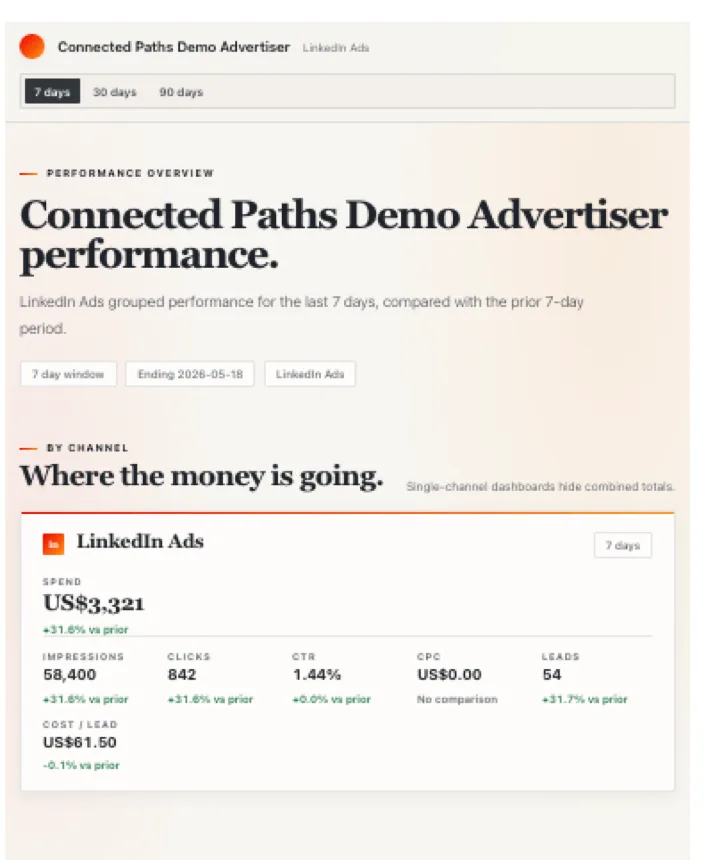
Connected Paths Demo Advertiser performance.

LinkedIn Ads grouped performance for the last 7 days, compared with the prior 7-day period.

7 day window Ending 2026-05-18 LinkedIn Ads
Spend
US$3,321
+31.6% vs prior
Impressions
58,400
+31.6%
Clicks
842
+31.6%
CTR
1.44%
+0.0%
CPC
US$3.94
-2.1%
Leads
54
+31.7%
Works with inLinkedIn Ads GGoogle Ads
Works in Claude ChatGPT
01
The problem

Paid media reporting hasn't kept up

Most teams spend more time formatting data than making decisions. A weekly report means exporting from Google Ads, doing the same in LinkedIn Ads, and then stitching it together in a spreadsheet that someone will have to interpret anyway.

That process works. It just takes longer than it should.

Paid Ads connects your ad accounts directly to Claude and ChatGPT. Type a question, get a visual report — campaign breakdowns, period comparisons, an expert-style summary — without touching a spreadsheet.

How it works

Three steps to your first report

Step 01

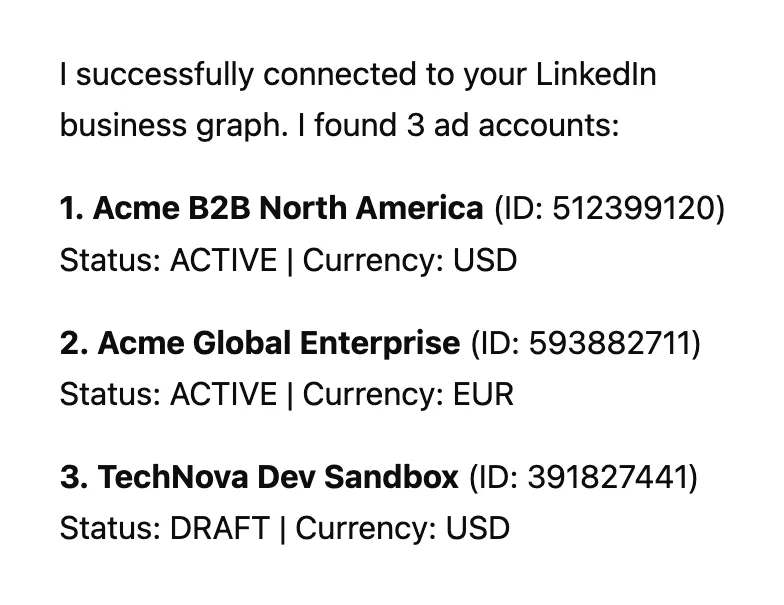
Connect your accounts

Link LinkedIn Ads and Google Ads with OAuth in a few clicks. Read-only access. We never write to your ad accounts.

Claude confirming three connected ad accounts
Step 02

Ask in natural language

Open Claude or ChatGPT and ask what you want to know — in plain English. No query syntax, no menus.

"Show me a 30-day report for all my accounts."
"Which campaigns are wasting spend?"
Step 03

Get answers or visual reports

Get direct text answers to ad-hoc questions, or ask for a visual report — Paid Ads renders dashboards, breakdowns, and trend graphs right inside your chat.

Rendered LinkedIn Ads weekly report inside the chat
What you can do

Everything in your ad accounts — without leaving Claude or ChatGPT

Cross-channel reports

Google Ads and LinkedIn Ads in one dashboard. By channel, by campaign group, and all channels combined — in a single visual report.

Campaign group breakdowns

Not just top-line numbers. Drill into campaign groups and individual campaigns to see where results are actually coming from.

Period comparisons

7 days vs prior 7 days. 30 days vs prior 30 days. 90 days vs prior 90 days. Like-for-like every time.

Search term analysisGoogle

Review which search terms are driving results and where spend is matching terms it shouldn't.

Creative performanceLinkedIn

Compare ad creatives head-to-head — image, video, and text formats with the metrics that matter for each.

Demographic analysisLinkedIn

Break down performance by job function, seniority, industry, company size, and location — from your actual account data.

Change detection

Paid Ads tracks structural changes to your campaigns. Ask what changed and get a clear account of what's different and when.

Multi-account

Connect multiple LinkedIn Ads and Google Ads accounts. Manage clients or brands without switching dashboards or losing context.

?
Example questions

What you can ask

Type any of these directly in Claude or ChatGPT with Paid Ads connected.

"Generate a visual weekly report for my LinkedIn Ads for the last 7 days compared with the previous 7 days.
"Show a 30-day Google Ads visual report for my account.
"Review Google Ads search terms for the Cloud Data Platform campaign.
"Compare LinkedIn creatives for the selected campaign over the last 7 and 30 days.
"What changed in paid media performance this week?
"Which ads are wasting spend?
"Show me where search demand is leaking.
"Generate a report for my client Google and LinkedIn ads for the past 7 and 30 days.
Built for agencies

Multiple accounts. One conversation.

If you manage paid media for more than one client or brand, Paid Ads handles it. Multi-account support is built in. Connect all your accounts, tell Paid Ads which advertiser you're working on, and it keeps the context separate.

No switching dashboards. No starting a new session per client.

inAcme B2B — US
GAcme Global — EU
inTechNova Sandbox
PA
One conversation,
context kept separate
Why I built this
Riaz Kanani

I built the first LinkedIn Ads MCP server. After having to shut it down, I lasted two weeks before I couldn't take it anymore — working the old way felt like going backwards. So I rebuilt it standalone, added Google Ads at the same time, and turned it into a proper hosted product. This is how I actually work now. That's why I built it.

Riaz Kanani · Founder, Connected Paths
Security and data handling

Read-only by design. Your data stays yours.

Paid Ads connects to your ad accounts with OAuth. You authorise the connection — we never ask for your passwords or platform credentials.

What we store

Your OAuth credentials, workspace settings and campaign context you configure — objectives, notes, preferences — and structural snapshots of your campaigns for change detection. Snapshots include names, status, budget, and objectives. They answer "what changed?" — not for analytics.

What we don't store

Your performance data. Impressions, clicks, spend, CTR, CPC, search terms, demographic breakdowns — always fetched live from LinkedIn and Google Ads when you ask. We don't cache or retain performance numbers between sessions.

What we never do

Write to your ad accounts. Paid Ads cannot create campaigns, change budgets, edit targeting, publish ads, or make any other changes. Read-only is enforced at the server level — it's not a setting, it's how the server is built.

Retention

Account connection credentials and stored workspace context are retained while your subscription is active. If you cancel or close your account, stored context is deleted within 30 days. Billing records are retained for 7 years as required by law.

Credentials & infrastructure

OAuth tokens are managed by Auth0 and stored separately from your campaign context — never returned in tool responses or analysis outputs. Paid Ads runs on Render. Auth by Auth0. Observability via Honeycomb.

Privacy policy · Terms of service

Pricing

One plan. Everything included.

Google Ads and LinkedIn Ads, every report and analysis, multi-account support — in a single subscription.

Read Only
£XX / month
  • Google Ads + LinkedIn Ads in one dashboard
  • Visual weekly reports with channel tabs and trend graphs
  • Campaign group and campaign-level breakdowns
  • Period comparisons — 7, 30, and 90 days vs prior
  • Search term analysis (Google Ads)
  • Google Ads recommendations review
  • Keyword planning and forecasting (Google Ads)
  • Creative performance comparison (LinkedIn Ads)
  • Demographic breakdown — function, seniority, industry & more (LinkedIn)
  • Campaign change detection
  • Multi-account support — connect as many as you need
  • Works with Claude and ChatGPT
Start free trial →

14-day free trial. No credit card required. Cancel any time.

FAQ

Questions, answered

About the product
Does it change my campaigns?

No. Paid Ads is read-only. It can analyse performance and surface recommendations, but it cannot create campaigns, change budgets, edit targeting, publish ads, or make any changes to your Google Ads or LinkedIn Ads accounts.

Which AI tools does it work with?

Paid Ads works with Claude (Anthropic) and ChatGPT (OpenAI). Both platforms support the Model Context Protocol (MCP) that Paid Ads uses to connect.

Do I need to export anything?

No. Paid Ads fetches data directly from your ad accounts when you ask. No export, no CSV, no spreadsheet required.

What if I only use Google Ads, or only LinkedIn Ads?

That's fine. Connect whichever platforms you use. Reports and analysis cover the accounts you've connected.

Data and security
What ad data does it store?

We store your account connection credentials, workspace settings you configure, and structural campaign snapshots for change detection. Your performance data — impressions, clicks, spend — is always fetched live and never retained between sessions.

How long do you keep my data?

Your account connection credentials and stored workspace context are kept for as long as your subscription is active, then deleted within 30 days of account closure. Billing records are kept for 7 years as required by law. Full details are on the privacy page.

Where can I read the full privacy policy and terms?
Account and billing
Can I use it across multiple clients or accounts?

Yes. Multi-account support is built in. Connect as many LinkedIn Ads and Google Ads accounts as you need and switch between them in the same conversation.

Is there a free trial?

Yes — 14 days, no credit card required.

Start analysing your ad accounts in Claude or ChatGPT

Connect LinkedIn Ads and Google Ads in minutes. Read-only. No spreadsheets required.